Controls and Interfaces
Main View
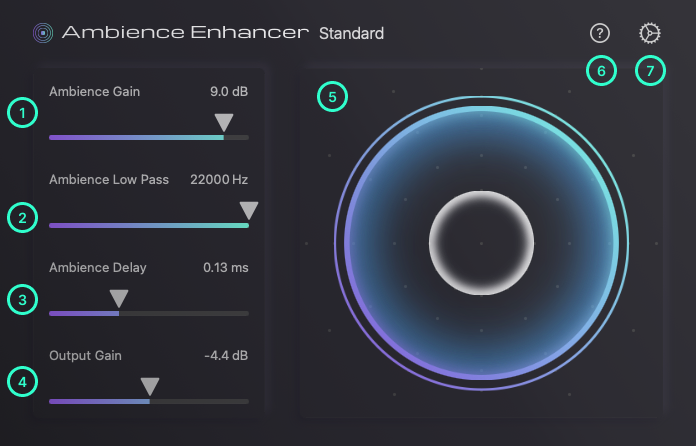
1. Ambience Gain
Gain to be applied to the ambience component. This parameter has no effect on the direct component.
2. Ambience Low Pass
Cutoff frequency of the low pass filter to be applied to the ambience component. This parameter can be used to reduce the presence of echo and reverb while preserving the localization and the glue of each recording. This parameter has no effect on the direct component.
3. Ambience Delay
Delay time for predelay applied to the ambience component. This parameter can be used to create a larger space while preserving the clarity of the direct component. This parameter has no effect on the direct component.
4. Output Gain
The gain that will be applied to the output of this plug-in after the ambience and direct components are summed.
5. Sound Field Visualizer
Visualization of the sound field image based on the parameter settings.
6. Documentation
Opens this documentation page in the browser.
7. Settings
Opens Settings view.
Settings View
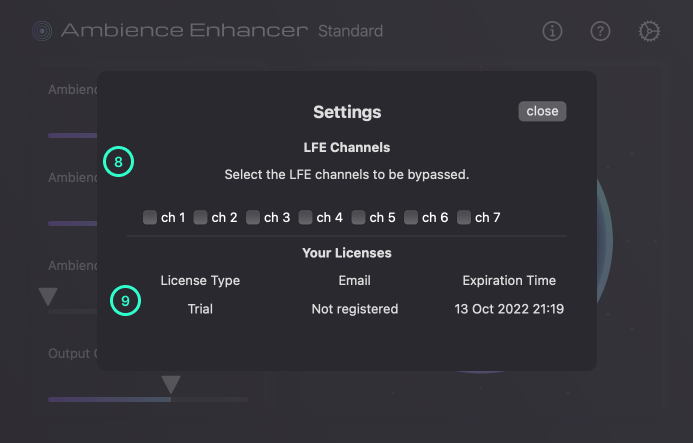
8. LFE Channels
By toggling the check box, you can select the LFE channels to be bypassed. This section is visible only when the plugin has an I/O with 3 channels or more.
9. Your Licenses
You can check the expiration time of your license.