Controls and Interfaces
Main View
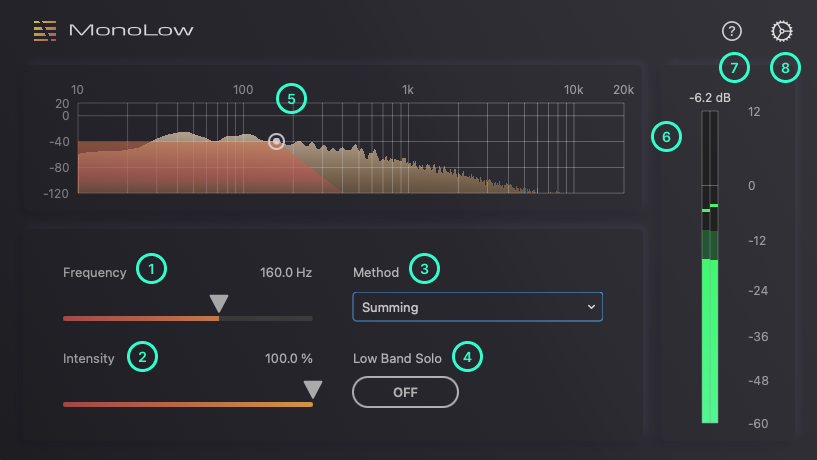
1. Frequency
Crossover frequency for splitting the low band and the other bands.
2. Intensity
The intensity of the monauralization effect. For example, when processing a stereo source, 0% preserves the original stereo width, while 100% produces full mono.
3. Method
The method parameter allow you to select the algorithm for monauralization. (Coming soon)
4. Low Band Solo
The Low Band Solo parameter allows monitoring only the low frequencies.
5. Spectrum Analyzer
Visualizes the real-time frequency response of the audio input to this plug-in.
By dragging the white handles to the left or right, you can set the Frequency parameter.
6. Level Meter
Indicates the output level of this plug-in.
7. Documentation
Opens this documentation page in the browser.
8. Settings
Opens the Settings view.
Settings View
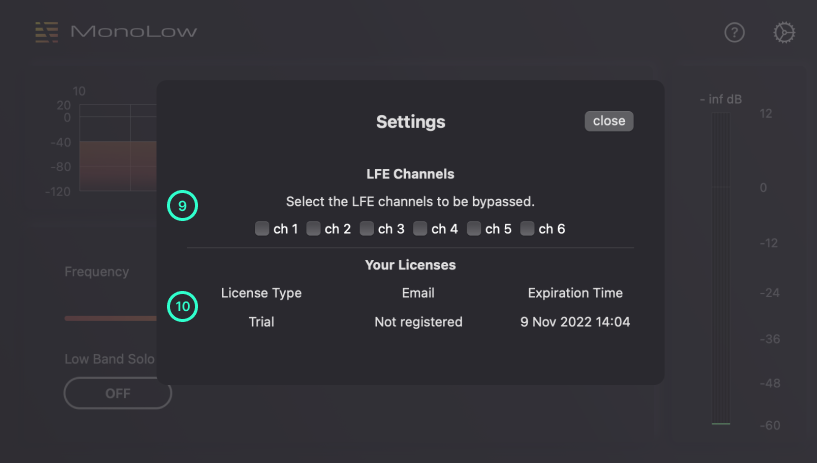
8. LFE Channels
By toggling the check box, you can select the LFE channels to be bypassed. This section is visible only when the plugin has an I/O with 3 channels or more.
9. Your Licenses
You can check the expiration time of your license.